
digital-safety · ByteSeguro Global
How to Spot an Online Scam Before You Click
The message may look genuine. Here is how to check its story without trusting its link.

Your phone lights up with a delivery notice. A parcel cannot be released until you pay a small fee. The message has a familiar logo, an order number and a button that seems to solve the problem in seconds. Perhaps you really are waiting for a delivery.
The danger is not only the link. It is the story built around it: a believable problem, a reason to hurry and an apparently easy solution. The same structure turns up in messages about bank accounts, job offers, unpaid tolls, investments and relatives who suddenly need help.
You do not have to decide whether a message is fraudulent to decide not to follow its instructions. You can check the claim through a route you already trust.
A message worth examining
The following is a fictional teaching example. It does not reproduce a genuine notice or point to a working website.
DELIVERY UPDATE: Your parcel is on hold. To prevent its return, pay the outstanding 2.40 fee within 30 minutes. Confirm at parcel-confirm.example.
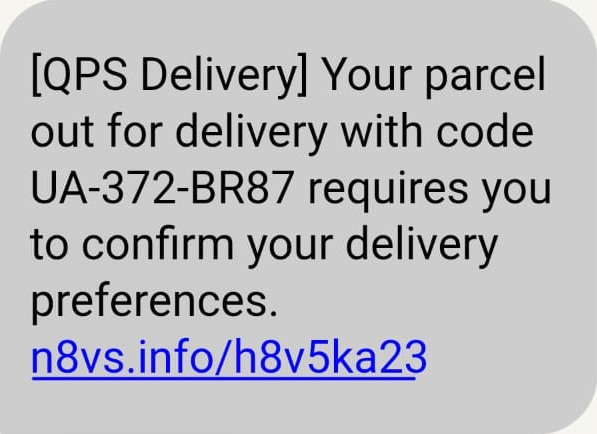

At first glance, it offers something useful: a way to keep a parcel moving. Look again and the message is doing three other things. It claims authority by sounding like a delivery service, creates urgency with a deadline and directs you to a website supplied by the sender. None of those features proves fraud on its own, but together they justify checking elsewhere.
The example address ends in .example, a reserved domain used for documentation, not a service for collecting payments. Real scam links should never be clicked merely to test them.
The important question is not 'Does it look real?'
An unfamiliar address, poor spelling or a clumsy logo may raise suspicion. Yet a polished message can be fraudulent too. The UK's National Cyber Security Centre warns that modern scams can be convincing even to experienced readers. QR codes, social media posts, advertisements and telephone calls can all carry the same deception.
Instead of inspecting appearances alone, ask three questions:
- Who is making the claim? A sender's display name, photograph or apparent phone number does not independently establish identity.
- What action is being demanded? Paying, sharing a code, installing an app, transferring money or revealing personal details creates a different level of risk from simply reading an announcement.
- How can I verify the claim without using the offered route? Open the organisation's app yourself, type its known address or use a trusted contact method from an existing statement or record.
This method is deliberately ordinary. It does not require you to recognise every criminal technique. It makes the scammer's preferred link, telephone number or QR code unnecessary.
Six familiar stories, one underlying tactic
A parcel held for a small fee. Check delivery status through the retailer's account or the carrier's app that you normally use. Do not assume a tracking number is genuine because it looks precise.
A bank account about to be frozen. Do not use the number or button in the warning. Contact the bank using details already known to you, such as those in your banking app or on your payment card.
A friend asking for urgent money. Contact the person through a separate, established channel. A familiar profile or voice is not sufficient proof that the request is genuine.
An investment promising unusually easy returns. Treat pressure to move money quickly as a warning, and verify any licence, provider and offer with the appropriate regulator in your jurisdiction. A regulator's logo in an advert is not verification.
A job asking for a payment up front. Check the vacancy and employer through channels you find independently. Be cautious when an alleged recruiter demands fees, credentials or financial details before a credible hiring process.
A support agent asking for a one-time code. Never read an authentication code aloud or paste it into a conversation at someone else's request. Codes are meant to confirm an action you initiated, not to validate the identity of a stranger contacting you.
These examples are not an exhaustive catalogue. The recurring mechanism is social engineering: exploiting trust, authority, fear or opportunity to make someone act before checking.
The safer route: pause, leave, verify
Pause. Set aside the deadline in the message. Real problems may need attention, but urgency is a reason to check carefully, not a reason to skip checking.
Leave. Do not reply, call the supplied number, scan the QR code or open the link as your first response. If you need the service, start a new session independently.
Verify. Look for the relevant order, bill, account alert or job vacancy through an official app or a website you reach yourself. If the claimed organisation cannot confirm the problem, do not take the requested action.
Protect. Where available, enable multifactor authentication, use a unique password for important accounts and keep devices and applications updated. These controls do not make scams disappear, but can reduce damage when credentials are exposed.
Report. Use the reporting tools of the relevant service and the official cybercrime or consumer-protection channels for your country. Reporting routes vary internationally; a telephone short code or agency named in one country may not operate in another.
What if you already clicked?
Clicking a link is not the same as entering a password, downloading software or sending money. The next step depends on what happened. Stop interacting with the page and avoid entering further details.
If you entered a password, open the genuine service separately and change it promptly, especially if you have reused it elsewhere. Review security settings and active sessions; enable multifactor authentication where possible.
If you shared card or banking details, approved a transfer or sent money, contact your bank or payment provider through its official channel immediately. Ask what protective steps, disputes or recovery options are available. Recovery is not guaranteed and procedures vary by country and payment method.
If you installed software or granted remote access, disconnecting the affected device from the internet may help limit an active connection. Get assistance from a trusted technical support provider, especially before continuing to use sensitive accounts on that device.
If you shared a one-time verification code, contact the affected service through its official support route, review account access and secure related accounts. A code can sometimes authorise a login or transaction even when the person sharing it never disclosed a password.
Do not send more money to a supposed recovery agent who promises to retrieve lost funds for another fee. Fraudsters can target people again after an initial loss.
A thirty-second check before acting
When a message asks you to do something consequential, ask: Was I expecting this? Who benefits if I respond immediately? Can I confirm the same information without touching the link?
If you cannot independently confirm it, waiting and seeking reliable advice is usually safer than following instructions written by an unknown sender. No checklist can guarantee that every scam will be detected, and genuine organisations can make mistakes in their own messages. The aim is to make important decisions through channels you control.
How this report was checked
This report draws on public guidance from the United States Federal Trade Commission, the United Kingdom's National Cyber Security Centre and INTERPOL, consulted on 17 October 2026. The illustrative message is fictional. Advice involving banks, law enforcement and reporting channels is intentionally general because procedures and legal rights differ between countries. The article does not claim to have tested individual scam links or interviewed victims.